
Save 51–70% on AWS EKS Cost: What Platform Teams Still Manage
Save 51–70% on AWS EKS Cost: What Platform Teams Still Manage

AWS EKS gives you a managed, certified Kubernetes-conformant control plane, run across three Availability Zones, so you never provision or patch the API server or etcd yourself. What you still own depends entirely on the deployment mode you pick. For minimal operational load, choose EKS Auto Mode. For full control over nodes, networking, and instance types, run standard EKS with eksctl or Terraform.
TL;DR:
- EKS Auto Mode reduces engineering effort by automating node provisioning, scaling, and patching, which significantly lowers total ownership costs compared to self-managed clusters.
- The control plane remains managed by AWS and is replicated across three Availability Zones, but node configuration and networking are still the user’s responsibility unless auto mode or Fargate is chosen.
- Using managed node groups with Terraform or CloudFormation enhances auditability and helps prevent drift, reducing security and operational risks associated with misconfigurations.
- EKS billing includes a fixed control plane fee and variable compute costs, with Auto Mode potentially saving up to 70 percent in total cost of ownership.
- Operational best practices emphasize strict security, centralized observability, scheduled patching, adequate VPC IP planning, and automation to ensure production cluster stability.
Table of Contents
- What Is AWS EKS? An Overview for Practitioners
- Key Features and AWS Integrations Engineers Rely On
- Which EKS Deployment Option Fits Your Team?
- What Does AWS Manage vs What Your Team Still Owns?
- How Do You Get Started With Amazon EKS?
- How Much Does EKS Cost, and Does Auto Mode Change That?
- Operational Best Practices for Running Production EKS
- Authoritative Next Reads on Amazon EKS
- Getting Full Visibility Across Your EKS Fleet
- Sources
- FAQ
What Is AWS EKS? An Overview for Practitioners
Amazon EKS runs upstream Kubernetes and holds official certified conformance, meaning manifests, Helm charts, and operators built for vanilla Kubernetes run on EKS without modification. That portability is the whole point: you are not locked into an AWS-specific orchestration API.
Three scenarios drive most EKS adoption: building cloud-native applications from scratch, migrating off self-managed kubeadm clusters to cut patching overhead, and running hybrid or edge workloads through EKS Anywhere or Hybrid Nodes while keeping one control plane for consistency. Integrations with VPC networking, IAM, and Application Load Balancer make EKS production-ready out of the box rather than a bare orchestration layer you have to wire together yourself.
Key Features and AWS Integrations Engineers Rely On
EKS’s core value sits in a small set of managed capabilities that remove recurring toil:
- Managed control plane across multiple Availability Zones, with automated version updates and unhealthy-node replacement handled by AWS.
- Flexible compute: EC2 self-managed nodes, Managed Node Groups for AWS-handled provisioning and updates, or AWS Fargate for serverless pods with no node management at all.
- IAM and Kubernetes RBAC integration, letting you map AWS identities directly to in-cluster permissions instead of maintaining separate credential systems.
- VPC CNI plugin, which assigns pods real VPC IP addresses rather than an overlay network, simplifying security group and firewall logic.
- ALB ingress controller for load balancing, plus CloudWatch and OpenTelemetry integration for logs, metrics, and traces.
- EKS add-ons, an opinionated catalog of managed extensions (CoreDNS, kube-proxy, VPC CNI itself) that AWS keeps patched on your behalf.
Which EKS Deployment Option Fits Your Team?
Your choice here decides how much Kubernetes operations work lands on your engineers versus AWS.
- Standard EKS: you manage node provisioning, scaling, and OS patching yourself. Pick this when you need custom AMIs, specialized instance types, or tight control over node configuration.
- EKS Auto Mode: AWS handles node lifecycle, autoscaling, instance selection, and OS patching automatically, which lowers engineering time spent on cluster maintenance.
- EKS Anywhere and Hybrid Nodes: run Kubernetes on-premises or at the edge while keeping the same management model and observability tooling you use in AWS.
- AWS Fargate: removes node management entirely for serverless pod execution, though per-pod billing and networking behavior differ from EC2-backed nodes.
Decide based on team Kubernetes expertise, compliance constraints, cost model, and whether you need specialized hardware like GPU or Graviton instances, which Auto Mode and Fargate support less flexibly than self-managed node groups.
What Does AWS Manage vs What Your Team Still Owns?
AWS is responsible for control plane components: the API server, etcd persistence replicated across three Availability Zones, and automated control-plane patching. That part of the shared-responsibility model is fixed regardless of deployment mode.
Everything below the control plane is yours to configure, unless you offload it to Auto Mode or Fargate: node images, node IAM roles, VPC and subnet IP design for pod networking, add-on configuration, and network policy enforcement.

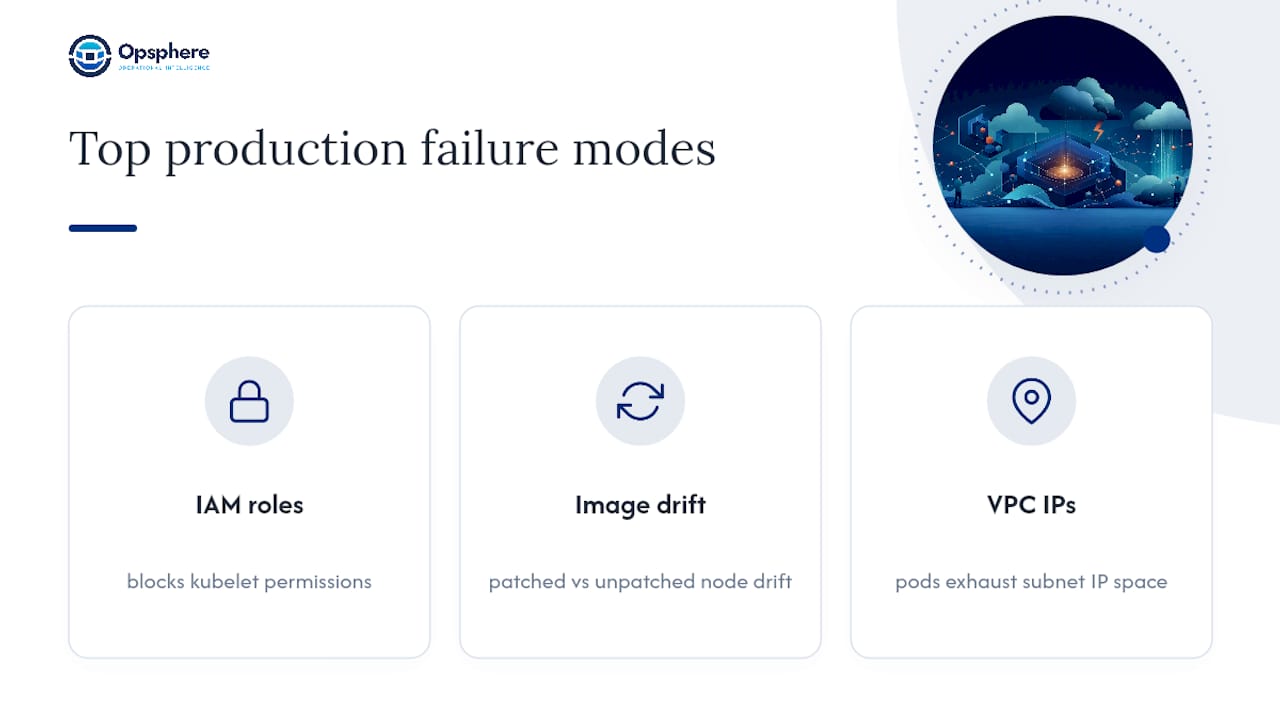
Most production incidents trace back to three failure modes: misconfigured IAM roles blocking kubelet permissions, node-image drift where patched and unpatched nodes diverge silently, and exhausted VPC IP space once pod density outgrows subnet planning. Security misconfigurations remain a leading cause of Kubernetes outages even with a fully managed control plane.
Pro Tip: Bake node images through a pipeline, not by hand, and store your node group and networking config in Terraform or eksctl YAML under version control. Drift you can’t diff is drift you can’t debug.
How Do You Get Started With Amazon EKS?
Three tools cover almost every EKS setup: eksctl for fast, reproducible cluster creation; Terraform or AWS CDK for production infrastructure as code; and kubectl alongside the AWS CLI for day-to-day operations.
A minimal, repeatable path looks like this:
- Prepare IAM roles and VPC subnets with adequate IP capacity for pods.
- Create the cluster using
eksctlfor a quick start or Terraform for anything going to production. - Create managed node groups, or configure Fargate profiles if you want serverless pods.
- Update your local kubeconfig to point at the new cluster.
- Deploy a test workload and wire up basic observability before anything real touches the cluster.
Use Managed Node Groups when you want AWS to handle provisioning but still control instance types. Reach for Terraform or CloudFormation over raw eksctl when auditability and compliance sign-off matter, since committed IaC gives you a reviewable history that ad hoc CLI commands don’t.
How Much Does EKS Cost, and Does Auto Mode Change That?
EKS bills the control plane on a per-cluster basis, separate from whatever EC2, Fargate, EBS, and data transfer costs your workloads generate. That split is why teams often underestimate total spend: the control plane fee is small, but worker compute dominates the bill.
Deloitte’s TCO analysis, referenced by AWS, found that EKS Auto Mode can cut total cost of ownership by 51 to 70 percent compared to self-managed or standard EKS deployments. The savings come mostly from reduced engineering effort spent on node patching, scaling logic, and instance selection rather than from cheaper compute itself.
Practical cost controls that apply regardless of deployment mode: right-size node instance types, use spot capacity where interruption tolerance allows, enable autoscaling to avoid idle capacity, and monitor per-namespace or per-team cluster spend continuously rather than at month-end.
Operational Best Practices for Running Production EKS
A cluster that passes a demo and a cluster that survives a real incident are different things. The gap is almost always operational discipline, not architecture:
- Security: use IAM roles for service accounts (IRSA) instead of broad node-level permissions, enforce least-privilege node roles, apply pod security standards, and manage secrets through AWS Secrets Manager or an equivalent rather than plaintext manifests.
- Observability: centralize logs and metrics, adopt OpenTelemetry or the AWS Distro for OpenTelemetry (ADOT), define SLO-driven alerts instead of raw threshold noise, and correlate alerts across services before paging anyone.
- Lifecycle: track the Kubernetes version support window, patch node images on a controlled schedule rather than reactively, and actually test cluster and etcd backup restores, not just take them.
- Networking: reserve enough VPC IP space for peak pod density up front, and apply Kubernetes network policies alongside CNI-level security groups.
- Runbooks and automation: script common remediation steps, maintain runbook playbooks for recurring incident types, and run postmortems that feed back into the runbooks.
Authoritative Next Reads on Amazon EKS
Go straight to primary sources: the EKS features page for control-plane specifics, the EKS Auto Mode page for TCO detail, and the eksctl getting-started guide for hands-on setup. Pair those with the AWS pricing calculator before you commit to a cluster architecture.
Getting Full Visibility Across Your EKS Fleet
Even a well-run EKS cluster generates alert noise once you’re operating more than one of them, and the AWS console alone won’t tell you why a pod eviction in one cluster correlates with an IAM throttling event in another. That’s the gap Opsphere is built to close.
Opsphere unifies operational context across EKS, AWS telemetry, observability tools, and CI/CD pipelines into one interface, so incident investigation stops requiring five open browser tabs. Its AI agents and read-only tool integrations correlate alerts, map real-time topology across clusters, and surface the causal chain behind an incident instead of just the symptom. That matters most for small SRE teams running multiple EKS clusters across accounts, where context switching costs more time than the actual fix does. If your platform team is stretched thin across platform engineering responsibilities, unifying that visibility is the next logical step. Try the Opsphere Web Client to see how correlated context speeds up your next EKS incident review.
FAQ
What Is AWS EKS?
Amazon EKS is a fully managed, certified Kubernetes-conformant service that runs the control plane across three Availability Zones, removing the need to provision or operate control plane instances yourself.
What Is the Difference Between AWS, ECS, and EKS?
AWS is the cloud platform; ECS and EKS are both container orchestrators AWS offers. ECS uses AWS’s proprietary scheduling model, while EKS runs standard, portable Kubernetes with manifests that work outside AWS too.
Are EKS and Kubernetes the Same Thing?
No. Kubernetes is the open-source orchestration project; EKS is AWS’s managed distribution of it, certified conformant so upstream Kubernetes tooling and manifests work without modification.
Why Is EKS So Expensive?
EKS bills the control plane separately from worker compute, storage, and data transfer, so the visible per-cluster fee is only part of the bill. EKS Auto Mode can lower total cost of ownership by 51 to 70 percent versus self-managed or standard deployments by cutting the engineering time spent on node patching and scaling.
Recommended
This article is provided for general informational purposes only and does not constitute professional, legal, security, or compliance advice. Please evaluate recommendations against your organization’s specific environment and requirements.