
5 Kubernetes Production Checks for Developers, SREs and Platform Teams
5 Kubernetes Production Checks for Developers, SREs and Platform Teams
Kubernetes is the open-source system that automates deployment, scaling, and management of containerized applications, grouping containers into logical units for management and discovery. It handles rollouts, rollbacks, scaling, and self-healing so engineers don’t manually babysit every container. Read the official documentation next, or spin up a local cluster with kubectl and kind to see the reconciliation loop in action within minutes.
TL;DR:
- Kubernetes automates deployment, scaling, and self-healing of containerized applications, reducing manual oversight and operational toil.
- Its core primitives include pods, nodes, control plane components, namespaces, labels, services, and deployment objects, each handling specific orchestration tasks.
- Its declarative model and reconciliation loop enable continuous self-repair and consistent state management without imperative commands.
- Advanced features like rolling updates, auto-scaling, and secret management depend on proper configuration and resource planning, especially during rollouts.
- Extending Kubernetes with operators and tools like Opsphere improves management, observability, and incident response across cloud, infrastructure, and CI/CD layers.
Table of Contents
- What Is Kubernetes Built On? Core Concepts and Primitives
- What Features Does Kubernetes Actually Give You?
- How the Declarative Model and Reconciliation Loop Actually Work
- Deployments, Rolling Updates, and When to Use Blue-Green or Canary
- Running Kubernetes in Production: Monitoring, Security, and CI/CD
- The Kubernetes Ecosystem: Runtimes, Meshes, and Extensions
- Getting Started: Tools, Learning Path, and Production Readiness
- Why Kubernetes Operators Are Adding Opsphere to the Stack
- Sources
- FAQ
What Is Kubernetes Built On? Core Concepts and Primitives
Kubernetes runs on a small set of primitives, and once you understand how they connect, the rest of the system starts to make sense fast.
A Pod is the smallest deployable unit. It wraps one or more containers that share networking and storage, and it’s the atomic thing the scheduler places onto a machine. A Node is that machine, virtual or bare metal, running the services needed to host pods. Every node runs kubelet, an agent that talks to the container runtime through the Container Runtime Interface (CRI) to start, stop, and monitor containers. Kubernetes assembles these machines into a cluster that runs your workloads collectively rather than as isolated boxes.
The control plane is where cluster decisions get made. It includes:
- kube-apiserver, the front door for every
kubectlcommand and internal component request. - etcd, the consistent key-value store holding the entire cluster’s state.
- kube-scheduler, which decides which node a new pod lands on based on resource requests, taints, and affinity rules.
- kube-controller-manager, which runs the control loops that keep actual state matching desired state.
Namespaces slice a cluster into virtual partitions. A platform team might run payments-prod, payments-staging, and payments-dev as separate namespaces on the same cluster, each with its own resource quotas and RBAC rules. That’s how one cluster serves multiple teams without stepping on each other’s toes.
Labels and selectors are how Kubernetes finds things. You tag a set of pods with app: checkout and tier: backend, and a Service or Deployment uses a selector to find every pod matching those labels, regardless of which node they’re on or when they were created.
Services solve the problem of pods being ephemeral. A pod might die and get replaced with a new IP address at any moment, so Services provide a stable virtual IP and DNS name that routes traffic to whichever healthy pods currently match the selector. This is Kubernetes’ built-in service discovery and load balancing, and it’s the reason applications inside the cluster can call checkout-service instead of tracking individual pod addresses.
Put together: a Deployment creates pods, labels tie them to a Service, the Service gives them a stable address, and the control plane keeps watching to make sure the count and health match what you declared.
What Features Does Kubernetes Actually Give You?
Kubernetes earns its reputation for reducing operational toil through a handful of concrete mechanisms, not just marketing language.
Automated rollouts and rollbacks mean you change a container image version in a Deployment spec, and Kubernetes replaces old pods with new ones incrementally, watching for failures. If the new version starts crashing, you roll back with a single command, and the previous ReplicaSet comes back online.
Horizontal Pod Autoscaling (HPA) watches metrics, most commonly CPU utilization, and adjusts the pod count within a Deployment automatically. Teams running more mature setups feed it custom metrics like request queue depth or requests per second, since CPU alone often lags real demand signals.
Self-healing relies on two probe types working together:
- Liveness probes tell Kubernetes when a container is stuck and needs a restart.
- Readiness probes tell it when a container is healthy enough to receive traffic, pulling it out of the Service’s endpoint list otherwise.
Combined with the controller manager’s constant reconciliation, a crashed pod gets replaced without a human paged at 2 a.m.
Storage orchestration decouples pods from the disks they use. A PersistentVolumeClaim (PVC) requests storage with a given size and access mode, and a StorageClass defines how that storage gets provisioned dynamically, whether that’s a cloud provider’s block storage or an on-prem SAN. Stateful applications, databases especially, still require careful planning around StatefulSets and volume affinity, since Kubernetes doesn’t make persistence trivial just because it automates provisioning.
Secrets and ConfigMaps separate sensitive values and configuration from container images. The practical rule that separates safe setups from incidents: never bake API keys or database passwords into an image or a plain environment variable in your manifest. Mount secrets as files or inject them through a secrets manager integration, and rotate them on a schedule.
Statistic worth remembering: Kubernetes’ default rolling update strategy uses maxSurge, which defaults to 25%, meaning your cluster can briefly run at 125% of the normal pod count during a deployment. If your resource requests are tight, that surge is exactly when you’ll see scheduling failures.
How the Declarative Model and Reconciliation Loop Actually Work
The single biggest mental shift for anyone coming from traditional server management is the move from imperative commands to a declarative model. You don’t tell Kubernetes “start three containers.” You write a YAML manifest declaring “there should be three replicas of this pod running,” and the system takes responsibility for making that true, continuously, forever.
Here’s how that plays out mechanically:
- You submit a manifest through
kubectl apply, and it goes to thekube-apiserver, which validates it and writes the desired state intoetcd. - Controllers watch the API server for changes relevant to their domain. The Deployment controller notices a new or updated Deployment object.
- The controller creates or updates a ReplicaSet, which in turn creates Pod objects matching the desired count and template.
- The scheduler assigns each unscheduled Pod to a node based on available resources, affinity rules, and taints.
- kubelet on that node pulls the container image and starts the containers, reporting status back to the API server.
- The reconciliation loop keeps running. If a pod dies, the ReplicaSet controller notices the actual count no longer matches desired count and creates a replacement, without any human intervention.
That loop, running constantly and independently for every controller type, is why Kubernetes recovers from node failures, pod crashes, and even entire availability zone outages without a page firing for every blip. etcd is the single source of truth underpinning all of it. If etcd is corrupted or unavailable, the control plane loses its memory of desired state, which is exactly why etcd backups belong on every production readiness checklist, not as an afterthought.
Deployments, Rolling Updates, and When to Use Blue-Green or Canary
A Deployment is the object you’ll manage most for stateless applications. It doesn’t manage pods directly. It manages ReplicaSets, which in turn manage the actual pods, and that layering is exactly what makes rollbacks possible. Rolling back a Deployment doesn’t recreate pods from scratch; it just points back to the previous ReplicaSet.
The default RollingUpdate strategy has two governing parameters:
- maxSurge (default 25%) sets how many extra pods can be created above the desired count during a rollout.
- maxUnavailable (default 25%) sets how many pods can be offline at once during the update.
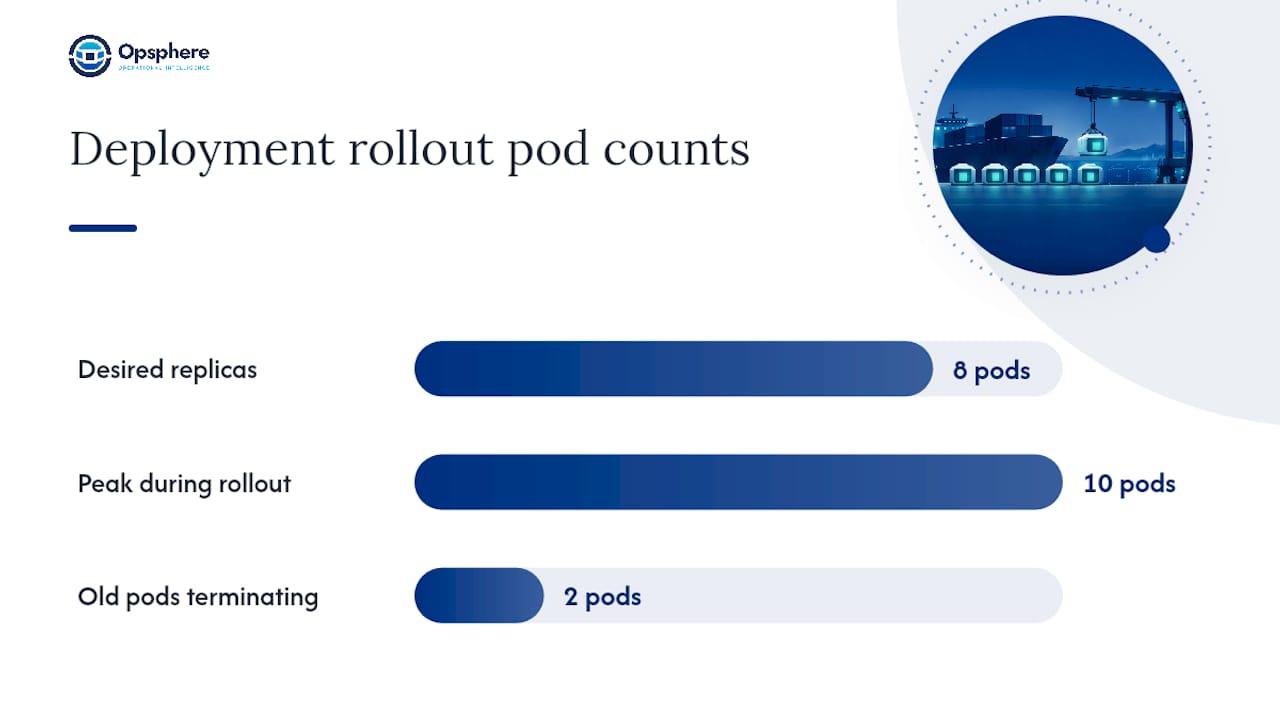
Practically, that means a Deployment with 8 replicas can briefly run up to 10 pods while 2 old ones are still terminating. It’s a sensible default for most stateless services, but it assumes your cluster has spare capacity to absorb that surge.
- Rolling updates fit most stateless services and are the default for good reason: gradual, automatic, low operational overhead.
- Blue-green deployments run the new version fully alongside the old one, then cut traffic over in one shot. Use this when a partial rollout state is unacceptable, such as with schema migrations that aren’t backward compatible.
- Canary releases send a small percentage of traffic to the new version before a full rollout. Kubernetes doesn’t do weighted traffic splitting natively; you’ll need an ingress controller or service mesh capable of percentage-based routing to do canaries properly.
- Recreate strategy kills all old pods before creating new ones. It’s the right call only when your application genuinely cannot run two versions simultaneously.
Pro Tip: *When a rollout stalls, check readiness probe failures first, then image pull errors, then resource shortages, in that order.
Running Kubernetes in Production: Monitoring, Security, and CI/CD
Kubernetes ships as a set of composable building blocks, not a finished platform. It’s not a PaaS, and treating it like one, expecting logging, monitoring, and ingress to just work out of the box, is how teams end up with fragile production environments. Experts commonly describe it as “a platform for building platforms”, which sounds abstract until you’re the one wiring together the pieces it deliberately left pluggable.
The operational layer you need to add includes, especially if you’re interested in how serverless patterns compare: building a serverless web application that scales.
- Metrics and monitoring, typically Prometheus scraping cluster and application metrics, feeding dashboards and alert rules.
- Logging, since container filesystems are ephemeral and logs need to ship somewhere durable, usually through a log-forwarding daemonset.
- Distributed tracing, especially once a request touches five or six microservices and you need to know which one added the latency.
- Alerting tuned to reduce noise, because a naive setup pages someone every time a pod restarts normally during a routine rollout.
For CI/CD, most mature setups keep Kubernetes manifests in Git and reconcile the cluster to match that Git state, a pattern generally called GitOps. Image promotion moves a specific, immutable image tag through dev, staging, and production rather than rebuilding at each stage, and secrets get injected at deploy time through a secrets manager rather than committed alongside the manifests.
Security has layers of its own:
- RBAC (Role-Based Access Control) binds permissions to roles rather than individual users, scoped to namespaces wherever possible instead of cluster-wide.
- Network policies restrict which pods can talk to which other pods, since Kubernetes’ default network behavior allows all pod-to-pod traffic unless you explicitly lock it down.
- Image scanning catches known vulnerabilities before an image ever reaches a cluster.
- Supply chain controls, like signed images and admission controllers that block unverified sources, close the gap that scanning alone leaves open.
Pro Tip: Run an RBAC audit quarterly, not just at onboarding. Service accounts accumulate permissions over time as teams add integrations, and a forgotten cluster-admin binding from a six-month-old debugging session is a common, quiet security gap.
When something breaks in production, the real difficulty usually isn’t any single Kubernetes event. It’s correlating that event with what’s happening in the underlying cloud infrastructure, the application layer, and the deployment pipeline, all at the same time, under pressure. That correlation problem is exactly where an operational intelligence layer earns its place alongside your existing observability stack, connecting a pod eviction to the node’s memory pressure to the deploy that shipped ten minutes earlier.
The Kubernetes Ecosystem: Runtimes, Meshes, and Extensions
Kubernetes doesn’t run containers itself. It delegates that job through the Container Runtime Interface (CRI) to a runtime like containerd or CRI-O, both of which work directly with Kubernetes as pluggable execution engines. This abstraction is why Kubernetes could drop direct Docker Engine support years ago without breaking workloads: the CRI contract stayed stable even as the runtime underneath changed.
Traffic management splits into two overlapping tools:
- Ingress controllers handle external HTTP/HTTPS traffic entering the cluster, routing by hostname or path to the right Service. This covers most straightforward web application needs.
- Service meshes add a layer for service-to-service traffic inside the cluster, handling mutual TLS, fine-grained traffic splitting, and detailed request-level metrics between internal services. Reach for a mesh when you need per-service traffic control at a granularity ingress alone can’t provide, not by default for every cluster.
Custom Resource Definitions (CRDs) and operators let you extend the Kubernetes API with your own object types and the controllers that manage them. A database operator, for instance, can turn “provision a new PostgreSQL cluster” into a single custom resource instead of a dozen manually coordinated manifests. The operational tradeoff: every CRD you add is another component with its own upgrade cycle and failure modes to track.
Managed distributions handle control plane operation for you, while self-managed clusters put etcd backups, API server upgrades, and control plane availability squarely on your team. Neither is universally correct; it depends on how much control plane operations your team wants to own directly.
Getting Started: Tools, Learning Path, and Production Readiness
Three tools cover almost every practical Kubernetes need. kubectl is your daily driver for interacting with any cluster. kind or minikube spins up a disposable local cluster in minutes for testing manifests before they touch anything real. kubeadm bootstraps a self-managed production cluster when you’re not using a managed control plane.
A sensible learning path looks like this:
- Local cluster first. Get comfortable with
kubectl, pods, and Deployments onkindbefore touching anything shared. - Automated CI pipeline. Wire up a pipeline that builds, tests, and pushes images automatically before manual deploys become a habit you have to break later.
- Staging cluster. Mirror production configuration closely enough that surprises show up here first, not in production.
- Production cluster, only once the previous three stages are boring and predictable.
Before anything ships to production, run this checklist:
- Confirm etcd backups run on a schedule and have actually been tested for restore, not just backup.
- Set resource requests and limits on every container, not just the ones that misbehaved once.
- Add readiness and liveness probes to every deployment, tuned to real startup time.
- Confirm logging and metrics pipelines capture the namespace before launch, not after the first incident.
- Run an RBAC audit to confirm no service account has broader access than its actual job requires.
Why Kubernetes Operators Are Adding Opsphere to the Stack
Kubernetes gives you the orchestration primitives. It doesn’t give you a unified view across the cloud infrastructure, CI/CD pipeline, and observability tools sitting around it, which is usually where incident triage actually loses time.
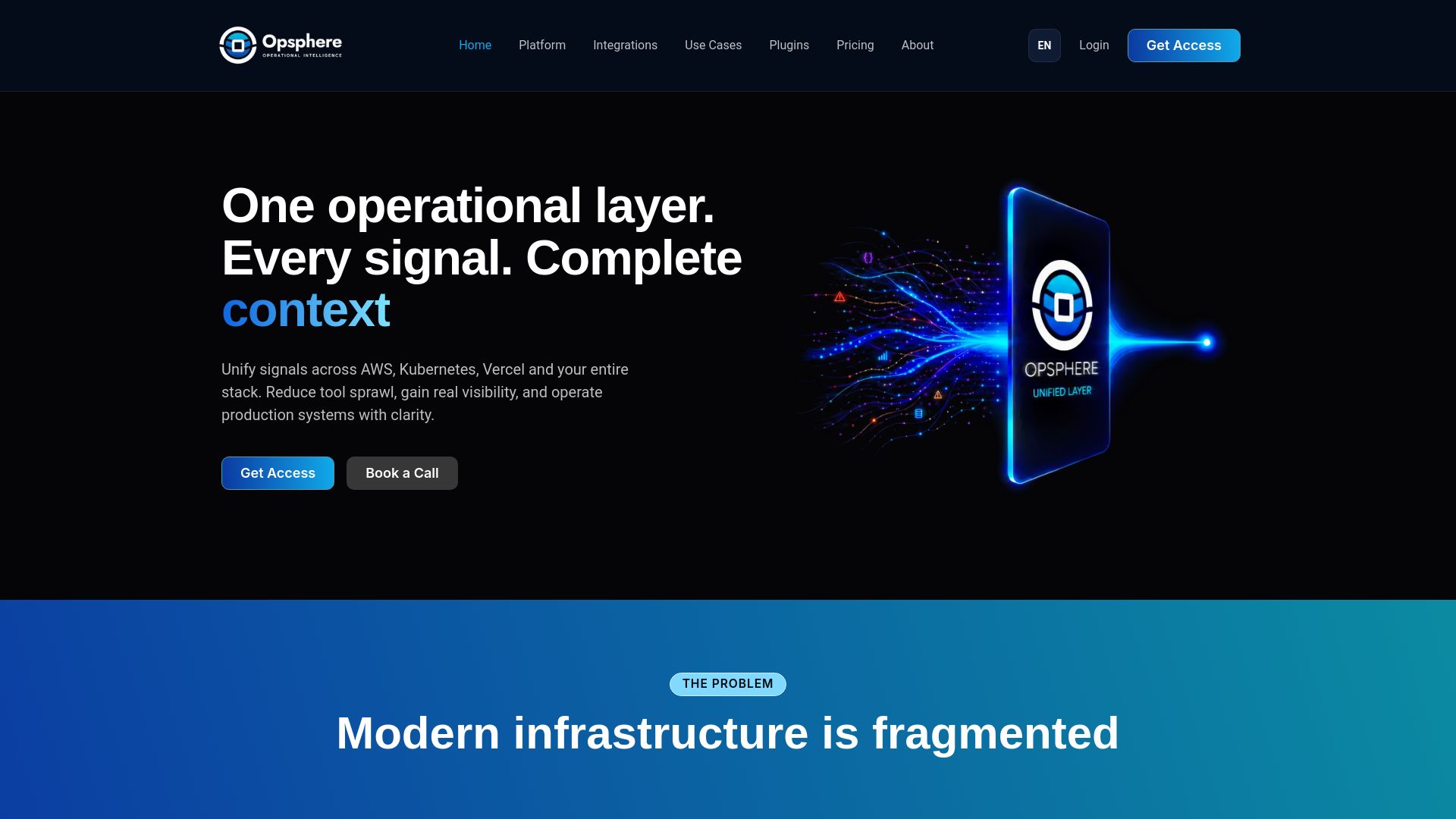
Opsphere connects to your existing Kubernetes, AWS, GCP, Azure, and observability tools without requiring you to rip anything out, unifying operational context so investigation doesn’t mean tab-switching across six dashboards while an incident burns. It correlates alerts, reduces noise, and maps real-time topology so an on-call engineer can see that a pod eviction, a node’s memory pressure, and a deploy from ten minutes ago are the same story, not three separate alerts. Every integration runs strictly read-only, keeping each connected tool as the source of truth while Opsphere adds the correlation layer on top.
The Opsphere platform is built specifically for platform engineering and SRE teams juggling exactly this kind of cross-tool complexity. Plans start with a Developer tier, scale to a Team plan, and offer an Enterprise option for larger organizations, with full pricing details available on the Opsphere pricing page. If you’re running Kubernetes at any real scale, evaluate the web client against your current incident workflow and see how much faster triage gets when the context is already unified before you start looking.
Sources
The official Kubernetes documentation covers every core concept referenced here in more depth than any single article can, and it’s the first stop for accuracy on anything version-specific. The Kubernetes API reference for Deployment objects gives you the exact field-level spec for rollout strategies, replica counts, and update parameters. For architectural and historical context, the Wikipedia entry on Kubernetes traces its lineage from Google’s internal Borg system through its current stewardship under the Cloud Native Computing Foundation. If you’re deciding between traffic-splitting approaches, Auth0’s breakdown of deployment strategies is worth the extra read for the maxSurge math alone.
FAQ
What Does Kubernetes Actually Do?
Kubernetes automates the deployment, scaling, and management of containerized applications across a cluster of machines. It handles scheduling containers onto available nodes, restarting failed containers, scaling pod counts up or down based on demand, and routing traffic to healthy instances automatically.
Is Kubernetes the Same as Docker?
No. Docker builds and runs individual containers, while Kubernetes orchestrates many containers across a fleet of machines, handling scheduling, self-healing, and load balancing. You typically use both together: Docker or a similar tool to build the container image, Kubernetes to run it reliably at scale.
What Is the Relationship Between Kubernetes and Kafka?
Kubernetes and Kafka solve different problems and often run together rather than compete. Kafka is a distributed event streaming platform for moving data between systems, and it’s commonly deployed as a stateful application running on Kubernetes, using operators to manage its clustering and storage needs.
Why Do They Call It K8s?
“K8s” is a numeronym: the letter K, followed by the eight letters between K and s in “Kubernetes,” followed by s. It’s shorthand that stuck in the community the same way “i18n” is shorthand for internationalization.
Do I Need a Platform Like Opsphere If I Already Run Kubernetes?
Kubernetes handles orchestration, but it doesn’t unify context across your cloud provider, CI/CD pipeline, and observability tools during an incident. A layer like Opsphere correlates that context automatically, which speeds up triage without replacing any tool already in your stack.
Recommended
This article is provided for general informational purposes only and does not constitute professional, legal, security, or compliance advice. Please evaluate recommendations against your organization’s specific environment and requirements.